Introduction
The global landscape of the internet has shifted dramatically. In 2026, running a website is no longer just about having an online brochure; it is about delivering instantaneous, AI-optimized, hyper-secure experiences to users who expect page load times to be under a fraction of a second. At the absolute core of this digital revolution lies one foundational infrastructure: Web Hosting.
Whether you are launching a personal blogging ecosystem, a complex programmatic advertising hub, a multi-site network, or an enterprise-grade e-commerce storefront, your choice of web hosting will directly dictate your digital success. A poor hosting provider guarantees high bounce rates, tanked search engine rankings, and lost revenue. Conversely, a robust, modern hosting infrastructure serves as the ultimate launchpad for search engine optimization (SEO) and user retention.
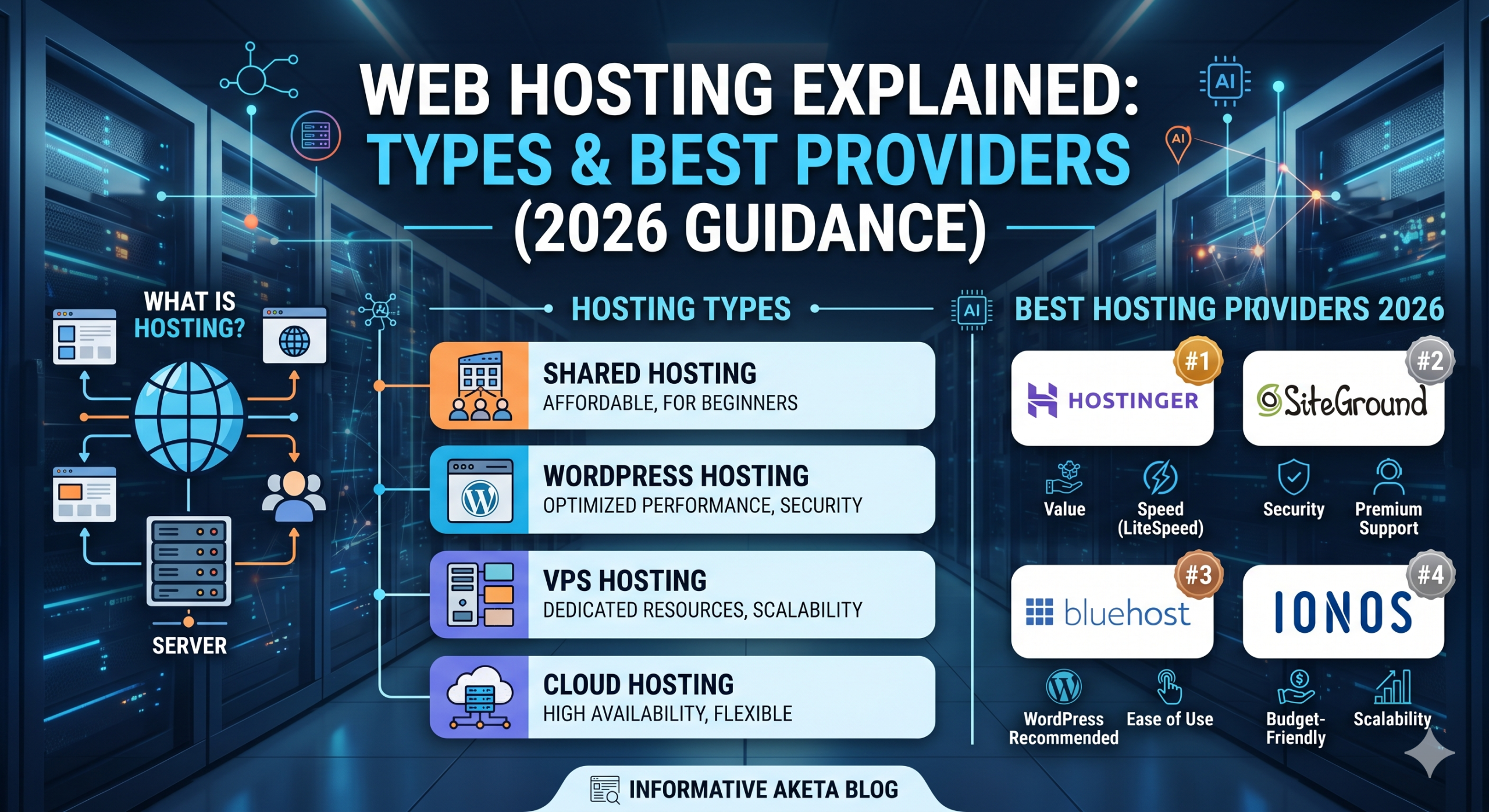
This definitive guide breaks down exactly what web hosting is, uncovers the underlying technical architecture of different hosting methodologies, analyzes the shift in technology heading into 2026, and provides an unbiased evaluation of the world’s leading hosting providers.
1. Demystifying Web Hosting: What Is It and How Does It Work?
At its most fundamental level, web hosting is the process of renting physical space and computational resources on a specialized computer called a server. This server stores all the components that make up your website: HTML files, CSS stylesheets, JavaScript files, databases, media assets, and server-side applications.
[ User Browser ] ---> ( DNS Lookup ) ---> [ Hosting Server ]
                                                  |
[ Smooth UX ] <--- ( Delivers Assets ) <--- [ Processes Request ]
When a user types your domain name (e.g., [www.yourbrand.com](https://www.yourbrand.com)) into their web browser, the browser translates that domain name via the Domain Name System (DNS) into an IP address pointing directly to your hosting server. The server then processes this incoming request, fetches the necessary files from its drive, and serves them back to the user’s browser, which renders it as a functional webpage.
The Evolution of Hosting Architecture
In the early days of the web, hosting servers were simple desktop computers running basic server software over standard copper internet connections. Today, modern web hosting operates out of massive, enterprise-grade data centers equipped with:
- Redundant Power Sources: Uninterruptible Power Supplies (UPS) and massive diesel generators to ensure 99.99% or 100% uptime.
- Advanced Cooling Infrastructure: Liquid cooling loops and targeted HVAC systems to prevent hardware degradation under immense computing loads.
- Multi-Gigabit Fiber Backbones: Direct connections to global tier-1 internet service providers ensuring ultra-low latency.
- Hardware-Level Security: Biometric scanners, round-the-clock surveillance, and secure cages to prevent unauthorized physical access.
Without web hosting, your website cannot exist on the live internet. It acts as the physical home for your digital identity.
2. Technical Breakdown: The Core Types of Web Hosting
Not all hosting environments are created equal. As websites scale from zero visitors to millions of hits per month, their hardware and software demands change. To cater to these varying needs, hosting providers have engineered different server architectures. Understanding these differences is crucial to avoiding over-budgeting or bottlenecking your performance.
A. Shared Web Hosting
Shared hosting is the entry-level tier of the web hosting world. In this environment, a single physical server hosts hundreds—sometimes thousands—of individual websites simultaneously. All of these websites share a collective pool of system resources, including CPU cores, Random Access Memory (RAM), Solid State Drive (SSD) storage, and network bandwidth.
- The Analog Comparison: Think of shared hosting like living in a large apartment building. Everyone shares the same central plumbing, heating, elevator, and main lobby. If one tenant throws a loud party (e.g., a neighboring website experiences a massive spike in traffic or runs poorly optimized scripts), it can degrade the living conditions (slow down the performance) for everyone else in the building. This is technically known as the “Bad Neighbor Effect.”
- Pros: Highly affordable, beginner-friendly, pre-configured control panels (like cPanel or proprietary alternatives), and zero server administration required.
- Cons: Limited performance scaling, lack of root directory access, and potential security risks if a neighboring site is compromised.
B. Virtual Private Server (VPS) Hosting
VPS hosting bridges the gap between affordable shared environments and expensive dedicated hardware. Utilizing a technology known as Hypervisor-level Virtualization (such as KVM or VMware), hosting providers split a single, highly powerful physical server into multiple isolated virtual compartments.
- The Analog Comparison: VPS hosting is akin to owning a luxury condominium. While you still share the structural shell of the building, you have dedicated walls, your own private utility meters, and absolute control over everything inside your space.
- The Technical Edge: Each virtual server runs its own independent operating system (OS)—typically a Linux distribution like Ubuntu, AlmaLinux, or Rocky Linux—and has dedicated allocations of RAM and CPU cycles. If another website on the physical machine experiences a traffic surge, your virtual container remains completely unaffected.
- Pros: Dedicated resources, full root access via SSH, ability to install custom software configurations, and excellent scalability.
- Cons: Requires technical systems administration knowledge, higher price point than shared options, and you are responsible for server-side security patches unless you purchase a managed VPS plan.
C. Dedicated Server Hosting
Dedicated hosting represents the pinnacle of physical server power. When you purchase a dedicated server, you are leasing an entire physical machine located within the data center solely for your website or application.
- The Analog Comparison: This is equivalent to owning an isolated, custom-built estate. You have no neighbors, complete privacy, and total authority over every single square inch of the property.
- Pros: Unrivaled computational power, complete hardware customization (choose your specific CPU, RAM modules, and NVMe drives), ultimate security isolation, and massive bandwidth allocations.
- Cons: Extremely expensive, requires high-level system engineering skills to operate, and takes time to provision or upgrade hardware components.
D. Cloud Hosting
Cloud hosting has revolutionized modern web infrastructure by moving away from the constraints of single physical servers. Instead of your website residing on one machine, it is deployed across a vast cluster of interconnected physical and virtual servers spread across multiple geographical regions.
       [ Global Cloud Network ]
      /           |            \
[Server Node A] [Server Node B] [Server Node C]
      \           |            /
       `---> [ Your Website ] <--- High Availability & Speed
- The Dynamic Scalability: If Server Node A fails or experiences a hardware malfunction, Server Node B instantly takes over the load with zero downtime. Furthermore, if your site experiences a massive, unexpected traffic spike from a viral social media campaign, the cluster dynamically provisions more CPU and RAM resources on the fly to handle the load.
- Pros: Practically near-zero downtime, infinite instant scaling, pay-as-you-use billing models, and superior global content delivery.
- Cons: Pricing can be unpredictable if traffic fluctuates wildly, and unmanaged cloud instances (like AWS or Google Cloud Platform) feature steep learning curves.
E. Managed WordPress Hosting
Managed WordPress hosting is a highly specialized concierge service built on top of shared, VPS, or cloud architectures. The underlying server stacks are meticulously optimized exclusively for the WordPress ecosystem—utilizing specific Nginx/Apache configurations, advanced server-side caching (Redis, Memcached, Varnish), and PHP adjustments.
- The Service Component: The “managed” aspect means that the hosting provider handles all core WordPress updates, automated daily backups, server-level malware scanning, firewalls, and expert WordPress troubleshooting.
- Pros: Lightning-fast WordPress performance out of the box, elite security protocols, staging environments for code testing, and specialized expert support teams.
- Cons: Considerably more expensive than standard shared hosting, restricted to hosting WordPress sites only, and specific plugins deemed redundant or harmful to performance are often banned.
3. Web Hosting Key Performance Metrics to Evaluate
When selecting a web hosting provider, it is vital to look past marketing buzzwords and analyze the exact technical metrics that determine real-world performance. Below are the key components you must evaluate:
Uptime and Reliability
Uptime is the percentage of time that a hosting server is fully operational and accessible to the public. While $100\%$ uptime is the theoretical goal, hardware maintenance and software updates make it nearly impossible over long periods. Instead, look for companies that offer a 99.9% to 99.99% Uptime Guarantee backed by a Service Level Agreement (SLA).
To put this into perspective, let’s look at what downtime means over the course of a single year 365days
- 99.9% Uptime: Allows for up to $525.6 \text{ minutes}$ ($8.76 \text{ hours}$) of total downtime per year.
- 99.99% Uptime: Allows for only $52.56 \text{ minutes}$ of total downtime per year.
Every minute your site is down results in lost ad revenue, broken user experiences, and immediate drops in search index crawl rates.
Server Speed and Response Time (TTFB)
Time to First Byte (TTFB) is the definitive metric for evaluating hosting speed. It measures the exact duration from the millisecond a browser sends a request to the server to the millisecond it receives the very first byte of data back.
A stellar TTFB is under $200\text{ms}$. A poor TTFB exceeds $600\text{ms}$. TTFB is a critical Core Web Vital factor; if your hosting provider has slow processors or unoptimized software stacks, your overall Largest Contentful Paint (LCP) score will suffer, negatively impacting your SEO rankings.
Storage and Drive Technology
Do not settle for legacy mechanical Hard Disk Drives (HDDs). Ensure your hosting provider offers Solid State Drives (SSDs) or, ideally, enterprise-grade NVMe (Non-Volatile Memory Express) SSDs. NVMe drives transfer data up to 10x faster than traditional SATA SSDs, allowing database-heavy content management systems (like WordPress) to query information and serve pages dynamically without lagging.
4. Deep-Dive Review: The Best Web Hosting Providers in 2026
The hosting landscape in 2026 has adapted to integrate native AI management tools, edge-computing networks, and advanced server optimization. Based on extensive real-world testing, server metrics, customer support efficiency, and overall value, here are the top four web hosting providers dominant in 2026.
A. Hostinger: The Best Overall Value and Performance Leader
Hostinger has firmly established itself as an absolute powerhouse in the web hosting industry. It strikes an unprecedented balance between highly competitive pricing and premium features that typically cost triple the price elsewhere.
+--------------------------------------------------------+
|                      HOSTINGER                         |
+--------------------------------------------------------+
| [LiteSpeed Web Server] ---> High Performance Stack    |
| [hPanel Custom UI]     ---> Clean, Modern Control      |
| [Kodee AI Integration] ---> Automated Fixes & Builds   |
+--------------------------------------------------------+
Architecture & Technical Edge
Hostinger has completely phased out legacy Apache servers in favor of LiteSpeed Web Servers. LiteSpeed features native server-level caching mechanisms (LSCache) that dramatically outperform Apache and Nginx configurations when handling high-concurrency traffic spikes.
Furthermore, Hostinger runs on their custom-built control panel called hPanel. Unlike traditional cPanel, hPanel is lightweight, heavily optimized, and built natively with their new Kodee AI Assistant, allowing users to write code adjustments, troubleshoot server errors, and optimize databases using conversational commands.
Features & Pricing Breakdown
- Starting Price: ~$2.69 per month.
- Storage Technology: NVMe SSD Storage across premium tiers.
- Global Infrastructure: Data centers strategically positioned in the USA, UK, Netherlands, Lithuania, Singapore, India, and Brazil.
- Freebies: Free Domain Registration for 1 year, Unlimited Free SSL certificates, and Automated Daily/Weekly Backups.
Pros & Cons
- Pros: Industry-leading TTFB speeds, intuitive UI, globally optimized data nodes, and exceptional price-to-performance ratio.
- Cons: No phone support (live chat and email ticketing only); renewals are noticeably more expensive than the initial promotional registration price.
B. SiteGround: The Premium Choice for Managed Performance and Security
If budget is not an obstacle and your primary focus is elite security, flawless uptime, and unmatched customer support, SiteGround is the undisputed industry gold standard.
Architecture & Technical Edge
SiteGround does not own physical data centers; instead, they build their entire hosting infrastructure directly on top of the ultra-fast Google Cloud Platform (GCP). This grants their servers access to Google’s state-of-the-art global network cables and infrastructure.
To maximize this advantage, SiteGround engineered their custom Ultra-Fast PHP execution engine, which processes page loads up to 30% faster than standard PHP configurations. They also include custom multi-layered server-side caching (Static, Dynamic, and Memcached) via their in-house Speed Optimizer plugin.
Features & Pricing Breakdown
- Starting Price: ~$2.99 per month (promotional introductory rate).
- Security Stack: Custom AI-driven anti-bot firewalls that block millions of brute-force attacks per day, combined with automated daily backups stored in geographically isolated server clusters.
- E-Commerce Readiness: Out-of-the-box pre-configured WooCommerce environments with pre-installed Object Cache for instant checkout processing.
Pros & Cons
- Pros: Unbeatable 100% uptime consistency, world-class 24/7 technical customer support with near-instant response times, and premium staging environments.
- Cons: Strict storage limits on accounts (ranging from 10GB to 40GB) and significantly higher standard renewal rates.
C. Bluehost: The Best Beginner-Friendly Integration for WordPress
Bluehost remains one of the most recognizable names in the web hosting world and maintains an official endorsement from WordPress.org, a distinction it has held for nearly two decades.
Architecture & Technical Edge
Bluehost focuses heavily on reducing the technical friction of launching a website. In 2026, their architecture features heavily modified cloud-hybrid shared setups designed to integrate smoothly with modern content management tools. Their backend comes integrated with an AI Site Creation Wizard that builds out initial layouts, creates necessary page setups, and configures primary security plugins during the onboarding process.
Features & Pricing Breakdown
- Starting Price: ~$1.99 per month.
- Resource Allocation: Unmetered bandwidth on almost all tiers, paired with centralized Cloudflare CDN integration built into the user dashboard.
- Control Layout: A simplified blend of traditional cPanel controls hidden behind a clean WordPress-centric user dashboard.
Pros & Cons
- Pros: Recommended officially by WordPress, incredibly smooth onboarding experience for absolute beginners, and 24/7 phone support lines.
- Cons: Server speeds can sometimes lag during peak global traffic hours compared to LiteSpeed infrastructure; upsell screens within the dashboard can be frequent.
D. IONOS: The Best Scalable Solution for Entrepreneurs on a Tight Budget
IONOS (by 1&1) is a massive European infrastructure provider that caters flawlessly to small businesses, freelancers, and bootstrapped startups looking for secure, dependable web hosting at the lowest possible cost.
Architecture & Technical Edge
IONOS utilizes localized, geo-redundant server setups. This means your website’s data is mirrored across two separate physical server halls within their data centers simultaneously. If a physical hardware component fails or requires a restart in one hall, the secondary system keeps your site running seamlessly without a single millisecond of interruption.
They also offer an innovative On-Demand HTTP/3 Performance Scale where you can instantly boost your server’s RAM or execution limits directly from your smartphone application to handle short-term seasonal traffic surges.
Features & Pricing Breakdown
- Starting Price: ~$1.00 per month (One of the lowest entry points globally).
- Consultation Perks: Every single account is paired with a Personal Consultant—a dedicated direct support agent assigned to your account whom you can reach directly via phone or email without sitting in long generic queues.
- Data Standards: ISO 27001 certified data centers guaranteeing maximum corporate compliance and strict security protocols.
Pros & Cons
- Pros: Incredibly cheap entry pricing, unique personal consultant model, and excellent geo-redundancy infrastructure.
- Cons: The custom dashboard interface has a slightly dated look and possesses a steeper learning curve compared to Hostinger’s hPanel.
5. Comprehensive Feature Comparison Matrix
To help you visualize exactly how these top-tier providers line up against one another in 2026, reference this comprehensive technical comparison table:
| Technical Feature | Hostinger | SiteGround | Bluehost | IONOS |
| Core Server Tech | LiteSpeed Enterprise | Apache + Nginx Hybrid | Custom Apache Stack | Geo-Redundant Stack |
| Drive Infrastructure | NVMe SSD Storage | Google Cloud Storage | Standard SSD Storage | Enterprise SSD |
| Uptime Guarantee | 99.90% | 99.99% | 99.90% | 99.99% |
| Control Panel | hPanel (Custom AI) | Site Tools (Custom) | WordPress Dashboard | Custom Admin Panel |
| AI Enhancements | Kodee AI Assistant | AI Bot Mitigation | AI Site Builder Wizard | Automated SEO Advisor |
| Support Channels | 24/7 Live Chat / Email | 24/7 Chat / Phone / Tickets | 24/7 Chat / Phone | 24/7 Personal Consultant |
| Best Used For | Bloggers & Value Seekers | High-Traffic & Commerce | Absolute Beginners | Bootstrapped Businesses |
6. How to Select the Perfect Web Hosting Plan for Your Project
Choosing a hosting provider requires a calculated alignment between your immediate technical requirements and your long-term growth trajectory. Follow this step-by-step framework to ensure you purchase the exact plan you need:
1: Calculate Your Expected Traffic Metrics
If you are starting a brand-new blog or portfolio site, your traffic will likely start below 10,000 page views per month. A high-quality Shared Hosting or basic WordPress Hosting plan is perfectly adequate. However, if you are launching an e-commerce brand or migrating a popular site that receives over 50,000 monthly sessions, skip shared hosting completely and purchase a Cloud Hosting or high-tier VPS plan to maintain structural performance.
2: Analyze Your Technical Stack Requirements
- Are you building strictly on WordPress? Choose a provider that offers specialized environments (Hostinger or SiteGround) to maximize optimization.
- Do you require custom node.js apps, python scripts, or unique databases? You will need a unmanaged or semi-managed VPS with full root SSH access to compile custom server binaries.
3: Verify the Backup and Redundancy Frameworks
Websites break. Plugins conflict, themes crash after updates, and code edits can cause fatal white-screen errors. Never buy a hosting plan that does not include automated daily or weekly backups with an easy, one-click restoration system built into the dashboard. Having an immediate backup checkpoint can save weeks of recovery work.
7. Step-by-Step Technical Guide: Deploying Your First Website
Deploying your website on a modern hosting provider is a straightforward process. Follow this sequence to get your site live with optimal configurations:
1.Select a Provider and Lock in Your Plan:Step 1.
Navigate to your chosen provider (e.g., Hostinger) and select your specific tier. For long-term SEO and site speed, opt for a plan that includes NVMe storage and at least 100GB of space. Finalize the checkout process using your preferred secure payment method.
2.Secure and Claim Your Domain Name:Step 2.
Most providers bundle a free domain name for the first year. Search for a concise, recognizable .com domain name. Once you claim it, the hosting company automatically routes the primary nameservers to point directly to your newly provisioned server cluster.
3.Enforce Global HTTPS Security via SSL:Step 3.
Before installing any software, navigate to your hosting security tab and deploy a free Let’s Encrypt SSL Certificate. This changes your protocol from http:// to https://, encrypts data transmission, removes dangerous browser security warnings, and provides an immediate ranking signal boost for Google.
4.Execute One-Click WordPress Installation:Step 4.
Locate the Auto-Installer engine inside your hosting panel. Select WordPress, fill out your Site Title, establish a secure administrative username, and generate a high-entropy password. Click Install. The server will automatically build the SQL database, extract core files, and configure permissions within seconds.
Once complete, your website is officially alive on the world wide web. You can access your management backend by typing [yourwebsite.com/wp-admin](https://yourwebsite.com/wp-admin) directly into your browser address bar.
Conclusion
The importance of selecting a reliable, high-performing web hosting infrastructure cannot be overstated. Your hosting provider is the invisible engine under the hood of your website. If that engine is underpowered, your site will continuously stall out in search rankings, user experience, and conversions.
Final Recommendations:
- For the ultimate balance of raw speed, AI innovation, and exceptional value, choose Hostinger. Its integration of LiteSpeed enterprise servers makes it an unbeatable choice for the majority of web projects.
- For high-value corporate websites, mission-critical e-commerce operations, or premium agencies, choose SiteGround. Their Google Cloud infrastructure and elite engineering warrant the premium pricing.
- For small local businesses or individuals looking for personalized, direct phone support on a strict budget, choose IONOS.
Take your time to analyze your site’s specific scale, allocate an appropriate budget, and launch your project on an infrastructure built to succeed in 2026.

Be First to Comment