Introduction
If you are struggling with a slow WordPress site, you are silently losing over half of your potential traffic, leads, and sales every single day. In the fast-paced digital ecosystem of 2026, web performance is no longer an afterthought; it is a critical pillar of user experience and algorithmic rankings.
When a user clicks on your link from a search engine, you have a razor-thin window of less than three seconds to capture their attention. If your page fails to render instantly, they will hit the back button and spend their money on a competitor’s platform.
A slow WordPress site doesn’t just frustrate your human audience—it directly damages your search visibility. Google’s Core Web Vitals, specifically Interaction to Next Paint (INP) and Largest Contentful Paint (LCP), heavily penalize unoptimized, sluggish architectures.
Fortunately, turning a slow platform into a lightning-fast asset doesn’t require a degree in computer science. By understanding the core bottlenecks and implementing industry-standard infrastructure upgrades, you can dramatically accelerate your page loading speeds.
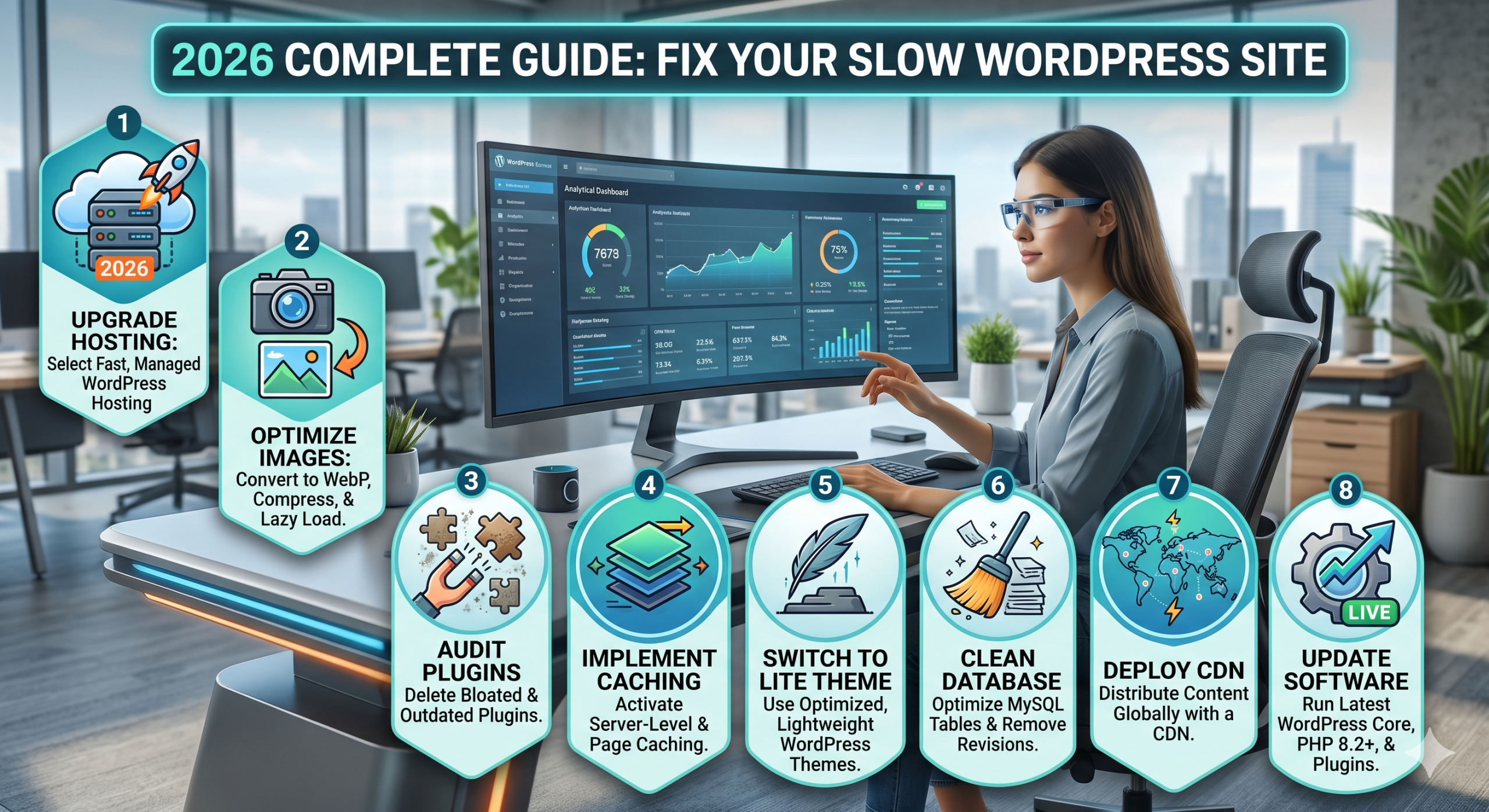
Below is an in-depth, high-authority guide revealing the 8 critical reasons behind a slow WordPress site and the exact steps you need to take today to fix it.
1. Substandard or Low-Quality Web Hosting
Your web hosting provider serves as the foundational bedrock of your digital presence. If you host your files on a crowded, ultra-cheap shared hosting server, your page load times will remain sluggish regardless of how much code optimization you perform.
On shared environments, your platform fights for CPU cycles, RAM, and network bandwidth against thousands of neighbor sites. The moment one of those sites encounters a sudden traffic spike, your server response time drops dramatically.
The Technical Fix: Upgrade to Managed Hosting
To permanently fix a slow WordPress site caused by server bottlenecks, migrate your setup to a specialized managed infrastructure provider or a dedicated Virtual Private Server (VPS) via reputable companies like Hostinger Cloud Hosting or DigitalOcean.
These platforms deploy isolated server containers, server-level caching layers, and native HTTP/3 architectures that instantly lower your Time to First Byte (TTFB).
2. Bloated and Unoptimized Media Files
High-resolution graphics make your articles engaging, but they are also the primary cause of severe layout shifts and slow load speeds. Uploading raw, uncompressed JPEGs or PNGs straight from design tools injects massive, multi-megabyte payloads into your page weight.
The Technical Fix: Adopt Next-Gen Image Standards
- Switch to WebP or AVIF: Transition away from traditional legacy formats. Next-gen image formats deliver identical visual quality at up to a 70% smaller footprint.
- Enable Automated Image Compression: Utilize advanced plugins like ShortPixel or Imagify to automate on-the-fly image optimization during your daily workflow.
3. Excessive Plugin Bloat and Inefficient Code
While the plugin repository is an incredible asset, activating dozens of third-party add-ons introduces massive code conflicts and unoptimized database queries. Every single plugin adds extra JavaScript and CSS layers that the visitor’s browser must download and parse before rendering the page.
The Technical Fix: Conduct a Plugin Audit
Regularly review your active plugins list. Deactivate anything that hasn’t been updated recently or that performs minor tasks you could easily handle with standard theme settings. For advanced control, tools like Perfmatters allow you to selectively disable scripts on a page-by-page basis.
4. Lack of Page Caching and Object Caching
Every time an organic visitor accesses a webpage on a non-cached system, your hosting server executes a series of complex PHP functions and database queries to dynamically build the HTML file. If multiple users hit your platform at the exact same moment, your server resources quickly saturate, leading to severe delays or database timeout crashes.
The Technical Fix: Layered Caching Deployment
Deploy a robust caching strategy by configuring a premium solution like WP Rocket or using the native server caching capabilities of LiteSpeed Cache. Additionally, activating object caching through Redis or Memcached will reduce database query stress on dynamic pages like user dashboards or shopping carts.
5. Heavy, Feature-Bloated Themes
Many multi-purpose themes advertise themselves as all-in-one solutions containing built-in sliders, custom widgets, and complex layout builders. However, this versatility comes at the cost of a massive, unoptimized codebase that loads unnecessary scripts across your entire platform.
The Technical Fix: Move to Clean, Lightweight Frameworks
Rebuild or switch your layout to lightweight, performance-first frameworks like GeneratePress, Astra, or Kadence. These themes keep their global page weight well under 50KB, ensuring your primary core structural elements load almost instantly.
6. A Fragmented, Cluttered Database
As your website ages, your database collects a massive amount of structural clutter. Every single post draft revision, uninstalled plugin setting table, spam comment, and expired transient option remains saved in your database indefinitely, causing queries to run much slower.
The Technical Fix: Routine Database Cleanups
Install a database optimization tool like WP-Optimize to safely flush out stale revisions, empty trash folders, and optimize database tables. To prevent future clutter, restrict your maximum post revisions by adding the following code snippet to your wp-config.php file:
PHP
define( 'WP_POST_REVISIONS', 3 );7. Disregarding Content Delivery Networks (CDNs)
If your primary host server is physically located in North America, a visitor accessing your data from Asia or Europe will face noticeable latency due to the geographic distance data packets must travel. Failing to distribute your static assets globally is a guaranteed way to keep a slow WordPress site underperforming internationally.
The Technical Fix: Implement a Global Edge CDN
Connect your domain setup to a global network like Cloudflare or Bunny.net. A CDN stores static assets (images, CSS, and JS) across a worldwide network of edge data centers, instantly serving files to your users from the closest regional facility.
8. Running Outdated Server Software and PHP Versions
WordPress operates on PHP, a server-side scripting language that receives regular major updates to improve core code execution speeds and security patch management. Running a live platform on legacy PHP editions like 7.4 means your processes run significantly slower compared to modern environments.
The Technical Fix: Force Upgrade to PHP 8.2+
Log into your hosting management dashboard (cPanel or hPanel), locate the PHP Configuration module, and update your environment version to PHP 8.2 or PHP 8.3. Ensure all themes and active plugins are updated before executing this change to maintain perfect environment compatibility.
Internal & External Reference Checklist
To review your optimization journey and ensure your platform aligns with the strategies outlined across our performance network, check out our core setup recommendations on the ads.024jobs.com Homepage. Additionally, you can learn more about official Core Web Vitals guidelines on the official web.dev Performance Portal.
Conclusion
A slow WordPress site is an entirely avoidable problem that directly impacts your search rankings and bottom-line revenue. By executing these 8 proven optimizations—ranging from hosting infrastructure upgrades to proper asset delivery pipelines—you can easily achieve sub-second load times. Audit your setup today, eliminate technical bloat, and give your audience the fast experience they expect.


Be First to Comment