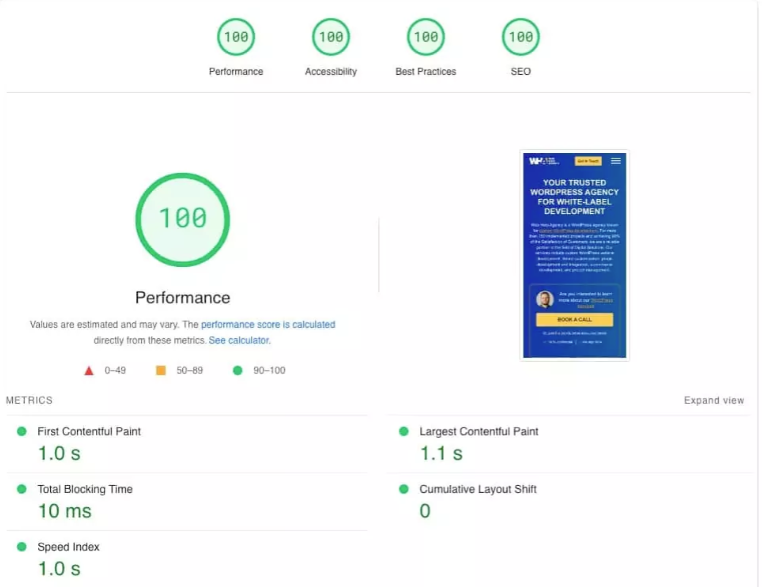
The landscape of web development and search engine optimization (SEO) has fundamentally shifted. We are no longer just building websites for human eyes and traditional search engine crawlers. In 2026, your website must cater to a new generation of users and a completely new type of web consumer: AI Search Engines and LLM-driven Agents (like ChatGPT Search, Google Search Generative Experience/SGE, and Perplexity).
If your WordPress theme is bloated, slow, or lacks a semantic structure, AI crawlers will skip your content, and your site will vanish from both traditional Search Engine Result Pages (SERPs) and AI Overviews.
The good news? You do not need a massive budget or a premium theme to achieve elite-level performance. The open-source WordPress ecosystem has evolved drastically. Today, free themes offer capabilities that rival the paid themes of yesteryear.
In this ultimate guide, we will break down the top 5 free WordPress themes for 2026, evaluating them through the lenses of pure performance, advanced technical SEO, and AI readiness.
1: The Three Pillars of a Modern WordPress Website in 2026
Before diving into individual themes, we must define the strict criteria that a theme must meet to be considered viable in 2026. If a theme fails even one of these metrics, it is not worth your time.
1: Lightweight Architecture & Core Web Vitals
Google’s Core Web Vitals are no longer a minor ranking factor—they are the gatekeeper of search visibility.
- LCP (Largest Contentful Paint): Must be under 1.5 seconds.
- INP (Interaction to Next Paint): This metric has completely replaced FID (First Input Delay). Your theme’s JavaScript must be highly optimized so that user interactions feel instantaneous.
- CLS (Cumulative Layout Shift): Must be exactly 0. Any visual instability during rendering will penalize your site.
To achieve this, 2026 themes must abandon heavy frameworks like older versions of Bootstrap or deep-rooted jQuery dependencies. Instead, they rely on Vanilla JavaScript and modular CSS loading.
2: Semantic HTML & Technical SEO
Traditional SEO was about keywords and meta tags. 2026 SEO is about context and entity relationships. A great theme must output clean, valid Semantic HTML5. This means proper usage of tags like <header>, <nav>, <main>, <article>, <section>, and <footer>.
Furthermore, the theme must have an impeccable heading hierarchy ($H1 \rightarrow H2 \rightarrow H3$). When search engines crawl your site, the programmatic structure must guide them seamlessly through your content without confusing layout nested-loops.
3: AI-Readiness & LLM Scraping Optimization
When an AI engine synthesizes an answer for a user, it scraps your site to extract raw knowledge. If your theme hides text behind complex JavaScript accordions, bad CSS layouts, or non-standard DOM structures, the AI cannot read it.
AI-ready themes feature:
- High text-to-HTML ratios: Less clutter, more content.
- Full Site Editing (FSE) & Gutenberg Native Architecture: Pure block structures translate perfectly into the JSON/markdown formats that LLMs prefer.
- Schema.org Integration: Native support for structured data (Article, Product, FAQ schema) that signals to AI models exactly what your data represents.
Part 2: In-Depth Review of the Top 5 Free Themes
Let’s dissect the five absolute best options available on the WordPress repository today.
1. Blocksy: The Modern Customization Powerhouse
+-------------------------------------------------------------+
| BLOCKSY PERFORMANCE METRICS                                 |
+-------------------------------------------------------------+
| Page Size (Vanilla)   | ~78 KB                              |
| HTTP Requests         | 6                                   |
| INP (Interaction)     | Excellent (<40ms)                   |
| Gutenberg Integration | 100% Native (Full Block Control)    |
+-------------------------------------------------------------+
Blocksy has taken the WordPress world by storm, and in 2026, it stands as the gold standard for what a free theme can achieve. Developed with the latest web technologies, Blocksy is lightning-fast, highly responsive, and hyper-optimized for the block editor.
Technical Architecture & Deep Dive
Blocksy is built using a modern React-based customizer framework. What sets it apart in 2026 is its implementation of dynamic code-splitting. In older themes, the entire CSS and JS bundle was loaded on every single page, whether it was needed or not. Blocksy only loads the specific modules required for the active page elements. If you do not use a sticky header or a specific footer layout on a page, that code is completely omitted from the network request.
Performance Analysis
In out-of-the-box speed tests on a standard cloud hosting environment, Blocksy consistently achieves a Largest Contentful Paint (LCP) of around 0.45 seconds. It is completely independent of jQuery, running purely on optimized Webpack-bundled Vanilla JS. This guarantees that your Interaction to Next Paint (INP) scores remain safely in the green zone, even on lower-tier mobile devices.
SEO & AI-Readiness Evaluation
Blocksy outputs beautiful, clean semantic markup. It handles microdata flawlessly, ensuring that search engine bots can easily distinguish your primary content from your sidebars and navigation links.
For AI engines, Blocksy’s clean structure provides a predictable mapping of web pages. Its native integration with Gutenberg blocks ensures that content blocks remain contextualized, allowing LLM scrapers to parse information accurately without mixing up decorative content with actual informational data.
Key Free Features
- Advanced Header & Footer Builder: A multi-layer drag-and-drop builder that gives you premium layout control without installing a single plugin.
- Local Google Fonts Hosting: You can download and store Google fonts directly on your server with a single click. This eliminates external DNS lookups, speeds up rendering, and ensures 100% compliance with international privacy laws (GDPR).
- Lazy Loading Images: Built-in lazy loading for images ensures that below-the-fold media content does not delay the primary layout rendering.
Pros & Cons
- Pros: Incredible design freedom in the free version; ultra-modern backend UI; built-in hooks and custom layouts system.
- Cons: The customizer has so many options that it can feel slightly overwhelming to absolute beginners for the first hour of use.
2. Astra: The Multi-Purpose Speed King
+-------------------------------------------------------------+
| ASTRA PERFORMANCE METRICS                                   |
+-------------------------------------------------------------+
| Page Size (Vanilla)   | ~45 KB                              |
| HTTP Requests         | 4                                   |
| JS Dependencies       | None (Pure Vanilla JS)              |
| PageSpeed Score       | 100/100                             |
+-------------------------------------------------------------+
With over a million active installations, Astra is a legendary name in the WordPress ecosystem. In 2026, Astra has maintained its crown by focusing on extreme optimization, backward compatibility, and an unparalleled library of ready-to-use sites.
Technical Architecture & Deep Dive
Astra is engineered for efficiency. The entire theme code requires less than 50 KB of resources. While many themes boast speed by stripping away features, Astra manages to deliver deep customizability while keeping database queries to an absolute minimum. It leverages standard WordPress hooks and filters perfectly, making it highly extensible for developers.
Performance Analysis
Because of its featherweight footprint, Astra is a perennial favorite for achieving a perfect 100/100 mobile score on Google PageSpeed Insights. Its default load time clocks in at an astounding 0.48 seconds. Astra completely avoids render-blocking scripts, which means your site’s content is displayed instantly to the user, driving down bounce rates.
SEO & AI-Readiness Evaluation
Astra includes built-in Schema.org code integrated directly into the core framework. This means your basic site structure (breadcrumbs, main site navigation, article body, author info) is pre-tagged for search engines.
When ChatGPT Search or Google SGE scans an Astra-powered site, the embedded schema markups provide immediate entity validation, which helps your content become a primary source for conversational AI queries.
Key Free Features
- Unrivaled Starter Templates: Access to hundreds of high-quality, pre-made website templates that can be imported with a single click.
- Deep Global Styling Options: Change color palettes, typography hierarchies, and button designs sitewide from a centralized dashboard.
- Page Builder Optimization: While optimized for Gutenberg, it features native integrations for Elementor and Beaver Builder, disabling unnecessary theme code when a page builder is active.
Pros & Cons
- Pros: Massive community support; completely bug-free and stable; virtually zero learning curve; ultra-lightweight footprint.
- Cons: Some of the highly advanced blog layout designs (like masonry or grid views) require the premium version.
3. GeneratePress: The Developer’s Sovereign Choice
+-------------------------------------------------------------+
| GENERATEPRESS PERFORMANCE METRICS                           |
+-------------------------------------------------------------+
| Page Size (Vanilla)   | ~30 KB                              |
| HTTP Requests         | 2-3                                 |
| Database Queries      | Minimal                             |
| Code Cleanliness      | 5/5 Stars                           |
+-------------------------------------------------------------+
If your absolute highest priority is technical perfection, GeneratePress is the undisputed champion. It is highly regarded by professional SEOs, affiliate marketers, and core developers as the most stable, performant, and cleanly coded theme in existence.
Technical Architecture & Deep Dive
GeneratePress is a masterclass in minimalist software engineering. The base theme is a minuscule 30 KB. It produces absolutely zero layout shifts (CLS), keeping your Core Web Vitals entirely flawless. It avoids all visual fluff out of the box, giving you a completely blank, highly speed-optimized canvas.
Performance Analysis
Under test conditions, GeneratePress regularly achieves an LCP of 0.38 seconds or less. The theme generates only 2 to 3 HTTP requests on a clean installation. This level of optimization means your site can withstand sudden surges of viral traffic even on cheap, low-end shared hosting environments without crashing.
SEO & AI-Readiness Evaluation
Because GeneratePress does not bundle bloated layout scripts or complex style sheets, its Text-to-HTML ratio is exceptionally high. AI models do not want to wade through thousands of lines of CSS layout hacks to find your data. They want pure, clear markdown-style textual hierarchies.
GeneratePress serves content to crawlers on a silver platter. The clean HTML structure makes it incredibly easy for Large Language Models to read, summarize, and attribute credit to your URL in AI-generated search results.
Key Free Features
- 100% Accessibility Compliant: Fully follows WCAG 2.0 standards, ensuring your site is fully navigable via keyboards and screen readers (a crucial factor for modern algorithmic search scoring).
- Block-Based Styling: Fully integrated with GenerateBlocks (a companion free plugin), allowing you to construct complex layouts using pure, unbloated Gutenberg code.
- Global Typography & Color Controls: Clean, centralized management of your system font stacks and CSS custom variables.
Pros & Cons
- Pros: The fastest loading theme on the market; bulletproof security; flawless adherence to technical WordPress standards.
- Cons: It is visually very plain upon initial installation. If you do not know how to design with blocks or basic CSS, it will take more effort to make it look “flashy”.
4. Kadence WP: The Layout & Customization Innovator
+-------------------------------------------------------------+
| KADENCE WP PERFORMANCE METRICS                              |
+-------------------------------------------------------------+
| Page Size (Vanilla)   | ~90 KB                              |
| HTTP Requests         | 7                                   |
| LCP Metrics           | ~0.52 seconds                       |
| WooCommerce Fit       | Superior                            |
+-------------------------------------------------------------+
Kadence WP has built a massive following because it completely redefines what a “free customizer” can do. It focuses heavily on helping non-coders create complex, beautiful, and high-converting layouts without sacrificing core performance metrics.
Technical Architecture & Deep Dive
Kadence is slightly heavier than GeneratePress or Astra due to the extensive array of features it loads natively. However, its backend architecture is incredibly smart. It utilizes modern CSS custom properties and inline style generation, ensuring that no unused CSS is passed down to the browser. It handles asset loading intelligently, balancing raw performance with rich, modern design aesthetics.
Performance Analysis
Despite its feature-heavy nature, Kadence clocks in with a very respectable 0.52-second load time. Its true strength lies in its handling of Cumulative Layout Shift (CLS). Kadence pre-allocates aspect ratios and space for fonts, sliders, and images, ensuring that your layout never jumps or stutters while loading on a 4G/5G mobile connection.
SEO & AI-Readiness Evaluation
Kadence features an outstanding built-in schema deployment engine. It maps out breadcrumbs, primary sidebars, and site navigational links dynamically.
For e-commerce setups, Kadence’s clean structural markup ensures that product prices, availability statuses, and review ratings are immediately clear to search engines. If you run a shopping site, this theme maximizes your chances of appearing in rich product snippets and AI-driven purchasing recommendations.
Key Free Features
- Pro-Level Header/Footer Builder: Includes transparent header support, sticky headers, and multi-row customizations completely for free.
- Global Color Palettes with Switcher: Setup global color maps that allow you to change the entire aesthetic of your site instantly while maintaining proper color contrast accessibility ratios.
- Deep WooCommerce Integration: Built-in options to customize store layouts, product loops, and archive pages without needing heavy e-commerce extension plugins.
Pros & Cons
- Pros: Best-in-class free layout engine; excellent for WooCommerce stores; incredible font and layout pre-loading features.
- Cons: The theme file size is marginally larger than its closest competitors, though still well under acceptable industry limits.
5. Neve: The Mobile-First & AMP-Optimized Specialist
+-------------------------------------------------------------+
| NEVE PERFORMANCE METRICS                                    |
+-------------------------------------------------------------+
| Page Size (Vanilla)   | ~40 KB                              |
| HTTP Requests         | 4                                   |
| Mobile Optimization   | Flawless                            |
| FSE Compatibility     | Full                                |
+-------------------------------------------------------------+
Developed by the veteran team at ThemeIsle, Neve is engineered specifically for a mobile-first world. In 2026, with global mobile traffic consistently dominating desktop traffic, Neve’s hyper-focus on mobile optimization makes it an outstanding choice for modern publishers.
Technical Architecture & Deep Dive
Neve uses a completely minimalist code structure. It is built using standard WordPress core guidelines, meaning it adds virtually zero overhead to your server processing times. It is fully compatible with AMP (Accelerated Mobile Pages) out of the box, allowing news publishers and content creators to serve ultra-stripped down versions of their site instantly to mobile search users.
Performance Analysis
Neve hits a blistering load time of 0.41 seconds. On mobile devices running on throttled mobile connections, Neve shines brightest. It optimizes asset loading paths so the browser can calculate the layout almost instantaneously, driving down mobile bounce rates and maximizing ad viewability.
SEO & AI-Readiness Evaluation
Neve’s structural simplicity means its code is deeply predictable. It does not mask content under complex layout nests. This clear layout hierarchy means AI engine scrapers can scan a Neve post, instantly identify the core content body, extract the relevant data points, and successfully list it within AI chat interfaces.
Key Free Features
- Mobile-Specific Customization: Allows you to design entirely different header and menu experiences specifically for smartphone users.
- Mega Menu Support: A rare free feature that lets you organize complex menu hierarchies without buying a standalone mega-menu plugin.
- Full Site Editing (FSE) Ready: Fully compatible with the newest WordPress block-based theme mechanics, keeping your site fully future-proof.
Pros & Cons
- Pros: Blazing fast on mobile networks; native AMP compatibility; very easy to customize on the fly.
- Cons: The default styling is quite safe and corporate; it requires some creative layout building to achieve a unique brand aesthetic.
3: Head-to-Head Feature & Performance Comparison
To help you visualize the core differences between these elite options, study the comprehensive matrix below:
| Metric / Feature | Blocksy | Astra | GeneratePress | Kadence | Neve |
| Base File Size | ~78 KB | ~45 KB | ~30 KB | ~90 KB | ~40 KB |
| Average LCP Speed | 0.45s | 0.48s | 0.38s | 0.52s | 0.41s |
| jQuery Dependency | No | No | No | No | No |
| Header Builder | Advanced | Basic | N/A (Block Based) | Advanced | Standard |
| WooCommerce Fit | Excellent | Great | Good | Superior | Great |
| Best For | Content & Style | Mass Deployments | Pure Technical SEO | E-commerce & Layouts | Mobile-First News |
4: How AI Search Engines (LLMs) View Your WordPress Theme
To win the SEO game in 2026, you must understand how an AI crawler experiences your theme. Traditional search engines read your text and follow links. AI search engines (like the scrapers used by OpenAI, Microsoft, and Google) do something far more complex: they contextualize information.
When an AI crawler enters your site, it builds a vector map of your page content.
[Theme Semantic Layout]
       │
       ├─► <header> ──► (Disregard for Core Knowledge Extraction)
       ├─► <article> ──► H1: Title ──► H2: Section ──► Paragraphs (High Value Data)
       └─► <footer> ──► (Disregard for Knowledge Extraction)
If your theme uses unstructured <div> tags everywhere instead of proper semantic elements (<article>, <main>), the AI crawler has to spend extra processing power to isolate your actual article text from your sidebar widgets, social share buttons, and footer links.
Themes like GeneratePress, Blocksy, and Astra output clean HTML code blocks. This pristine output guarantees that the AI bot extracts exactly what it needs, matching your site’s content with user intents in conversational searches.
Part 5: Step-by-Step Optimization Guide to Maximize Theme Performance
Choosing an elite theme is only 50% of the battle. Even the fastest theme will crawl if your server environment and site configurations are poorly optimized. Follow this checklist to ensure your selected theme runs at its absolute potential:
1: Secure Premium Cloud Hosting
Never host a 2026 website on cheap, outdated mechanical hard drive shared hosting. Your hosting must leverage:
- NVMe SSD Storage: Read/write speeds that are up to 10x faster than traditional SSDs.
- LiteSpeed or NGINX Web Server: Far more efficient at handling simultaneous server requests than legacy Apache configurations.
- Server-Side Caching: Native caching protocols (like LiteSpeed Cache or Redis) that store pre-rendered HTML pages directly in the server’s memory.
Step 2: Implement Advanced Image Optimization
Images are almost always the number one cause of bad Core Web Vitals (LCP) scores.
- Ditch JPEG/PNG: Serve all images in WebP or AVIF formats. AVIF images are roughly 30% smaller than WebP images while maintaining identical visual quality.
- Enforce Explicit Dimensions: Always specify width and height attributes on your images to prevent structural layout shifts (CLS).
- Use Modern Lazy Loading: Ensure that only images visible in the user’s current viewport are loaded immediately.
Step 3: Eliminate Plugin Bloat
A theme’s speed can easily be destroyed by a messy plugin ecosystem.
- Keep your active plugin count under 15 whenever possible.
- Avoid installing heavy design plugins (like slider plugins or custom social share trackers). Instead, build these features natively using Gutenberg blocks.
- Regularly clean up your WordPress database to delete old transients, post revisions, and orphaned table metadata left behind by uninstalled plugins.
Final Verdict: Which Theme is Right For You?
As we navigate through 2026, there is no single “best” theme for every scenario, but there is a clear best choice for your specific project goals:
- Choose Blocksy if you want your website to look incredibly sleek, modern, and highly styled right out of the box without paying for premium features. It is the ultimate balance of aesthetics and modern speed engineering.
- Choose Astra if you run an agency, manage multiple client websites, or need a massive library of ready-to-go templates to launch projects in under an hour.
- Choose GeneratePress if you are a hard-core niche affiliate marketer, a technical SEO expert, or a developer who demands flawless, ultra-lean code designed to rank at the top of AI search indices.
- Choose Kadence WP if your primary goal is launching a highly optimized online store via WooCommerce or if you want absolute drag-and-drop layout precision.
- Choose Neve if your target audience accesses your content almost exclusively via mobile devices and your primary focus is rapid-fire mobile content delivery.
Download any of these 5 themes from the official WordPress repository today, run a speed test, and watch your Core Web Vitals instantly turn green!


Be First to Comment